Changelog

What’s shipping in AO

Build notes for the AO platform, newest first: the Academy, terminal, accounts, community, market context, and performance tools.

  • New
  • Improved
  • Fixed
  1. Terminal

    Positions that catch up quickly after an update

    When we release an update, the service that follows your accounts now starts once, so Positions and Orders no longer pause for a few minutes.

    • FixedAO follows your accounts through a background service. When we release an update, a new copy of the service takes over your accounts from the old one. The old copy restarted as soon as it handed over and took your accounts back, so the new copy had to start again and reload every account's history. Meanwhile Positions and Orders could stop updating for a few minutes. Now the old copy waits a minute before it restarts, and the update removes it before then, so the new copy starts once. If the old copy is the one that stays, it still restarts after that minute and takes your accounts back.
  2. Terminal

    Positions that keep updating with long trade histories

    When the service that follows your accounts reloads a long trade history, it no longer stalls for minutes, so Positions and Orders keep updating on every account.

    • FixedAO follows your accounts through a background service. When it starts, it reloads each account's deals and orders. Once the accounts it follows had more than 10,000 deals and orders between them, that reload took minutes instead of seconds. Meanwhile Positions and Orders stopped updating on every account, and live connections dropped, which started the reload again. Now the service gets through a long history without stalling.
    • FixedWhen we release an update, a new copy of the service takes over your accounts from the old one. If two copies started at the same moment, the one left running could be the copy that had handed over. It stayed stopped, so Positions and Orders stopped updating until someone restarted it by hand. Now that copy restarts by itself and takes your accounts back.
  3. Terminal

    Positions that keep updating after a restart

    When the service that follows your accounts restarts, one failed check-in no longer stops it, so Positions and Orders keep updating.

    • FixedAO follows your accounts through a background service, which restarts from time to time, for example when we release an update. If its first check-in failed after a restart, the service stopped working but never shut down, so Positions and Orders stopped updating on every account until someone restarted it by hand. Now a failed first check-in is retried like any later one. If the service can't start at all, it shuts down and restarts by itself.
  4. Terminal

    Positions that come back after repeated drops

    If an account's live connection keeps dropping while your broker is still reachable, AO now reconnects it each time, as often as every five minutes, instead of at most once every half hour.

    • FixedAO reconnects an account whose live connection has been down for two minutes while your broker still answers, but it did so at most once every 30 minutes. If the connection dropped again soon after a reconnect, Positions and Orders stopped updating until the half hour was up. Now AO reconnects the account each time its connection drops, as often as every five minutes.
  5. Terminal

    Positions that come back after a dropped connection

    If the live connection to one of your accounts drops and doesn't come back while your broker is still reachable, AO now reconnects that account by itself.

    • FixedAO follows each account over a live connection through MetaApi. If that connection dropped and MetaApi couldn't restore it while your broker was still reachable, Positions and Orders stopped updating and could keep showing trades your broker had already closed until the service was restarted. Now, when an account's connection has been down for two minutes, AO checks that your broker still answers and, if it does, reconnects that account by itself.
  6. Terminal

    Positions that keep up after a resync

    When MetaApi resynchronises one of your accounts, AO now reloads only the trades it hasn't loaded yet, so Positions and Orders catch up in moments.

    • FixedMetaApi resynchronises each account every so often, for example when it moves the account to another server. AO used to reload the account's whole trade history before showing anything new, so on an account with a long history, Positions and Orders could take half a minute or more to catch up, and other accounts' updates waited behind it. A resync now reloads only the trades AO hasn't already loaded.
  7. PlatformTerminal

    A sign-in page that matches, and positions that match your broker

    The sign-in page gets the hosted sign-in page’s glow and pulsing dots, and AO now sets Positions straight by itself when the live connection falls out of step with your broker.

    • ImprovedThe sign-in page has the soft glow and pulsing dots of the hosted sign-in page, so the background no longer changes when you click Sign In. The dots hold still if your device is set to reduce motion.
    • FixedAO compares Positions with your broker every few minutes. If a position stays listed after your broker has closed it, one is missing, or one shows the wrong volume, AO reconnects that account by itself and the list corrects itself. Before, the list could stay wrong for hours.
    • The Anomaly’s Observatory sign-in card with its Sign In button, on a dark background with a glow at the top and rings of dots around the card.
  8. TerminalAnalysisDashboard

    Cleaner drawings, a quick measure, and All accounts totals that add up

    Drawing polish from The Anomaly’s review, a Shift-drag measure, zones that sit behind the candles, and All accounts figures that match the accounts you can see.

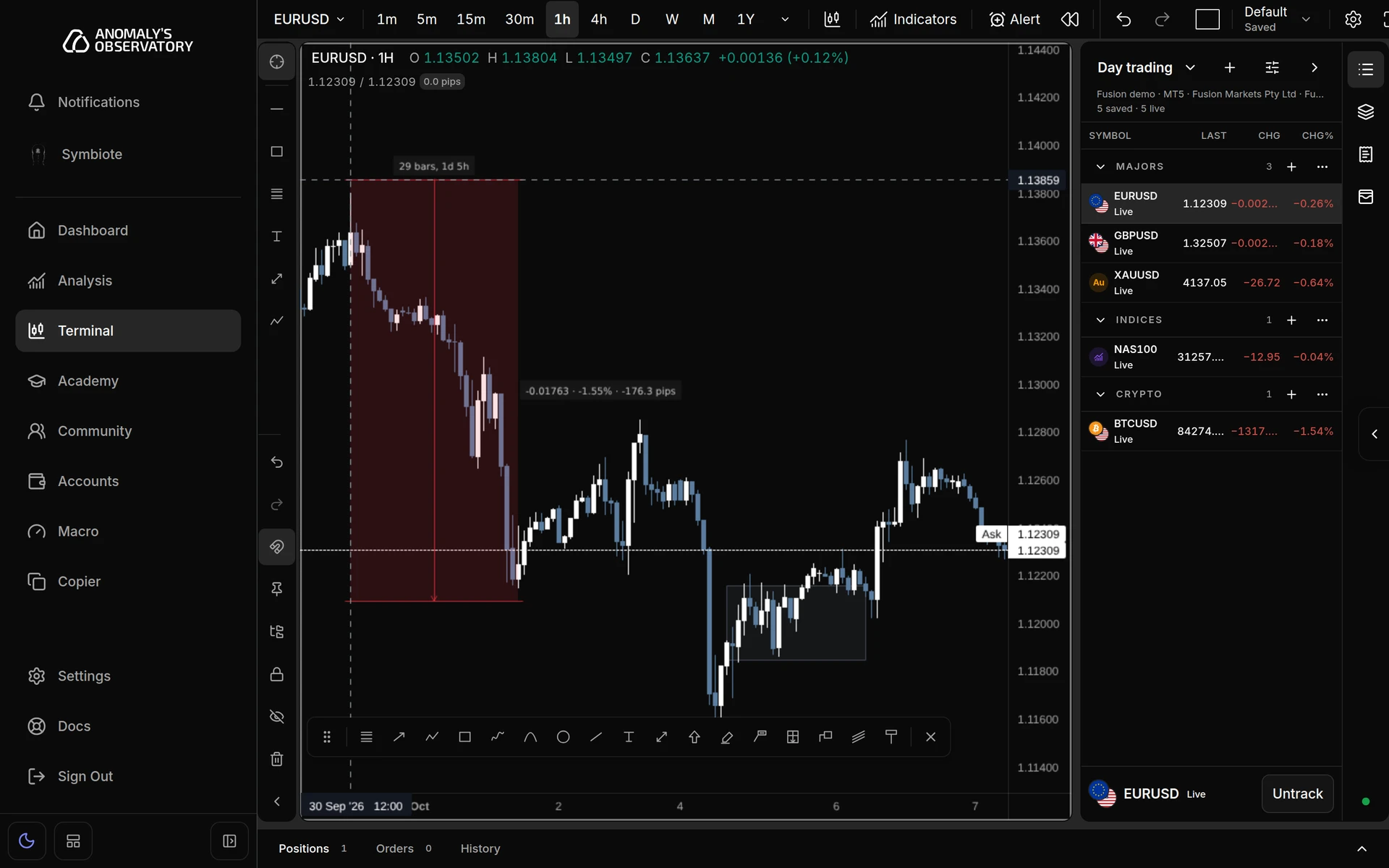
    • NewWith no drawing tool picked, hold Shift and drag across the chart to measure a move in price, percent, pips, bars and time. Nothing is saved, and the measurement goes when you let go.
    • NewMove below candles puts a drawing behind the candles, so a filled zone no longer hides them. It’s on a drawing’s right-click menu, its Visibility tab and the object tree.
    • ImprovedA selected drawing keeps its line weight and shows only its handles. Where drawings overlap, a click picks the nearest one, so a filled shape no longer catches clicks meant for a line. Text centred on a line breaks the line around it.
    • ImprovedNew drawings start with the last style you gave that tool, so the next Fib looks like the last one. Template › Reset to factory goes back to the built-in style.
    • ImprovedNote is now a white label with dark text and takes Callout’s place in the toolbar. Text, Note, Price note and Signpost open ready to type, and the Highlighter draws a broad, see-through stroke again.
    • ImprovedThe colour palette starts with a Brand row, colours you add are saved to your account, and line styles are picked from icons. With the magnet on, the crosshair snaps to the price your click will use.
    • FixedWeekly, monthly and yearly charts always show the bar that’s still forming, and it moves with live prices, so a monthly chart no longer ends on last month.
    • FixedAO Market Data rows read Closed when the market is closed instead of Stale, wait three minutes before calling a price Stale, and say how long it’s been quiet when you hover.
    • FixedRight-clicking near the bottom of the chart opens the menu instead of choosing whichever item opened under the pointer.
    • FixedAll accounts on Analysis and the Dashboard counts only the accounts listed in the account picker. Trades from accounts you’ve removed sit under their own Removed accounts option, so your All accounts figures may change.
    • A EURUSD chart with a Shift-drag measurement from a high down to a later low, labelled 29 bars, 1d 5h and -176.3 pips, beside a grey zone drawn behind the candles.
  9. Terminal

    A steadier connection, and a live watchlist across accounts

    The terminal notices when prices stop and reconnects on its own, layouts save as you work, and every watchlist row stays live whichever account the chart is on.

    • NewIf live prices stop updating during market hours, the terminal restarts the price feed by itself and tells you while prices are delayed.
    • ImprovedNew orders pause while the terminal reconnects or the broker link is down, and a market order on a price more than 10 seconds old asks you to confirm. Closing, editing and cancelling still work. They wait up to 10 seconds for the broker and send nothing if it can’t be reached.
    • ImprovedIf the broker doesn’t confirm an order in time, the terminal checks it against your account and shows Order not confirmed instead of a failure, so you know to look at Positions before trying again.
    • ImprovedRenewing the connection no longer pauses trading every 40 to 55 minutes, and a failed connection retries by itself.
    • ImprovedChart layouts save themselves a moment after you change a symbol, interval or arrangement, and switching layouts or accounts saves first instead of asking you to save or discard.
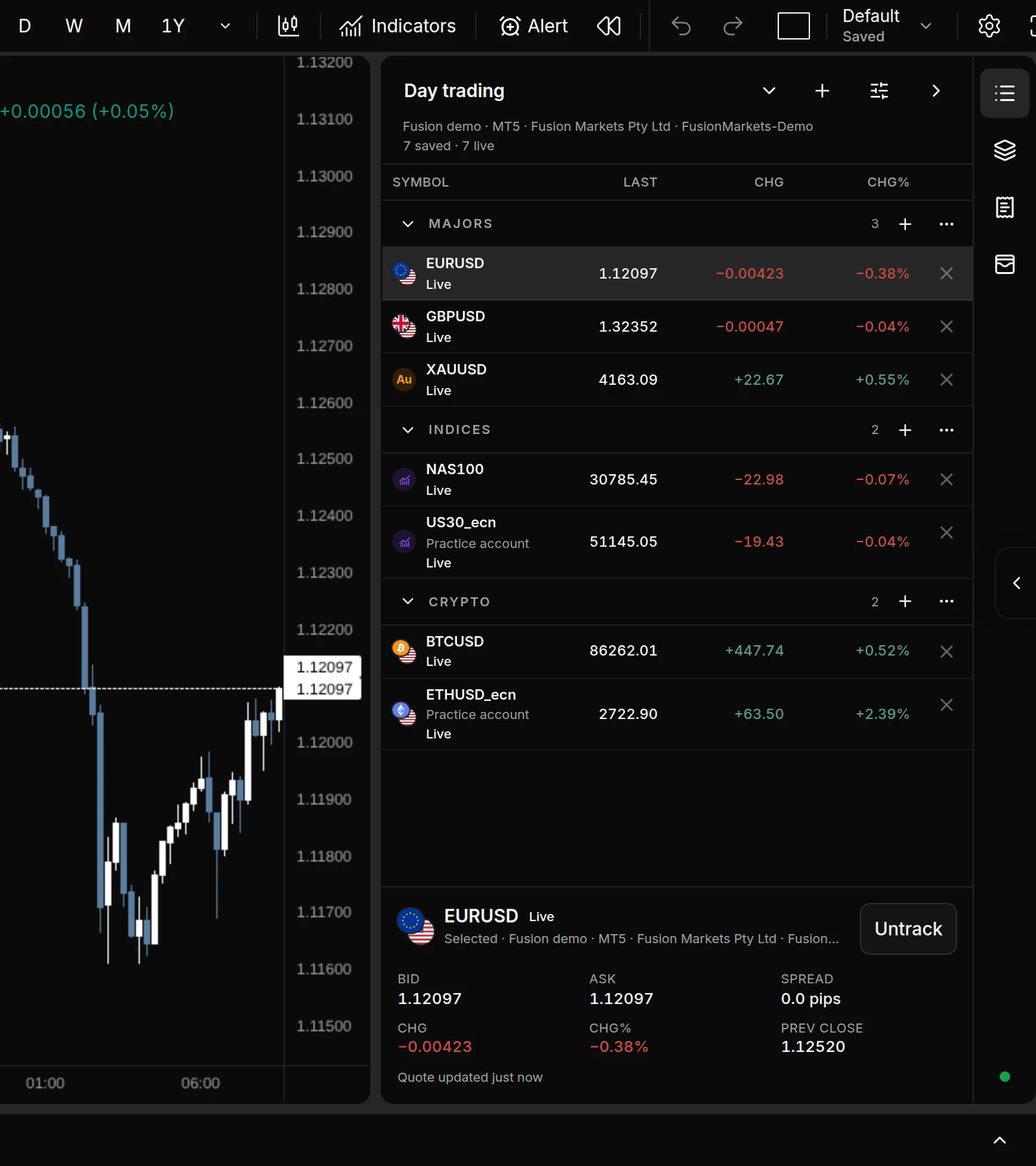
    • ImprovedWatchlist rows from your other broker accounts quote live, with last price, change and change %, for up to four accounts at once. Moving the chart to another account keeps the rest of the list live, and a row whose account is still connecting reads Waiting.
    • FixedSymbols saved in the wrong letter case, such as EURUSD.Z on a broker that lists EURUSD.z, get live prices again.
    • FixedStop and target changes made in quick succession no longer undo each other.
    • Watchlist with symbols from two broker accounts, every row showing last price, change and change %, while the chart shows one of the accounts.
  10. Terminal

    Favourite intervals back on the toolbar

    Your starred intervals are one-click buttons again, and the dividers between terminal panels are quieter.

    • FixedEvery starred interval is a button beside the symbol again, so changing timeframe takes one click. In a multi-chart layout the buttons change the active chart.
    • ImprovedWhen the active interval isn’t a favourite, the interval menu button shows its label. On a phone the buttons fold into that menu.
    • ImprovedThe dividers between the charts and the side panels are now a quiet gap that shows a line only when you hover over or drag them.
  11. TerminalSymbiote

    Multi-chart layouts, bar replay and trading from the chart

    Put up to 16 charts on one screen, replay past price action with simulated trades, and stage orders straight from the chart.

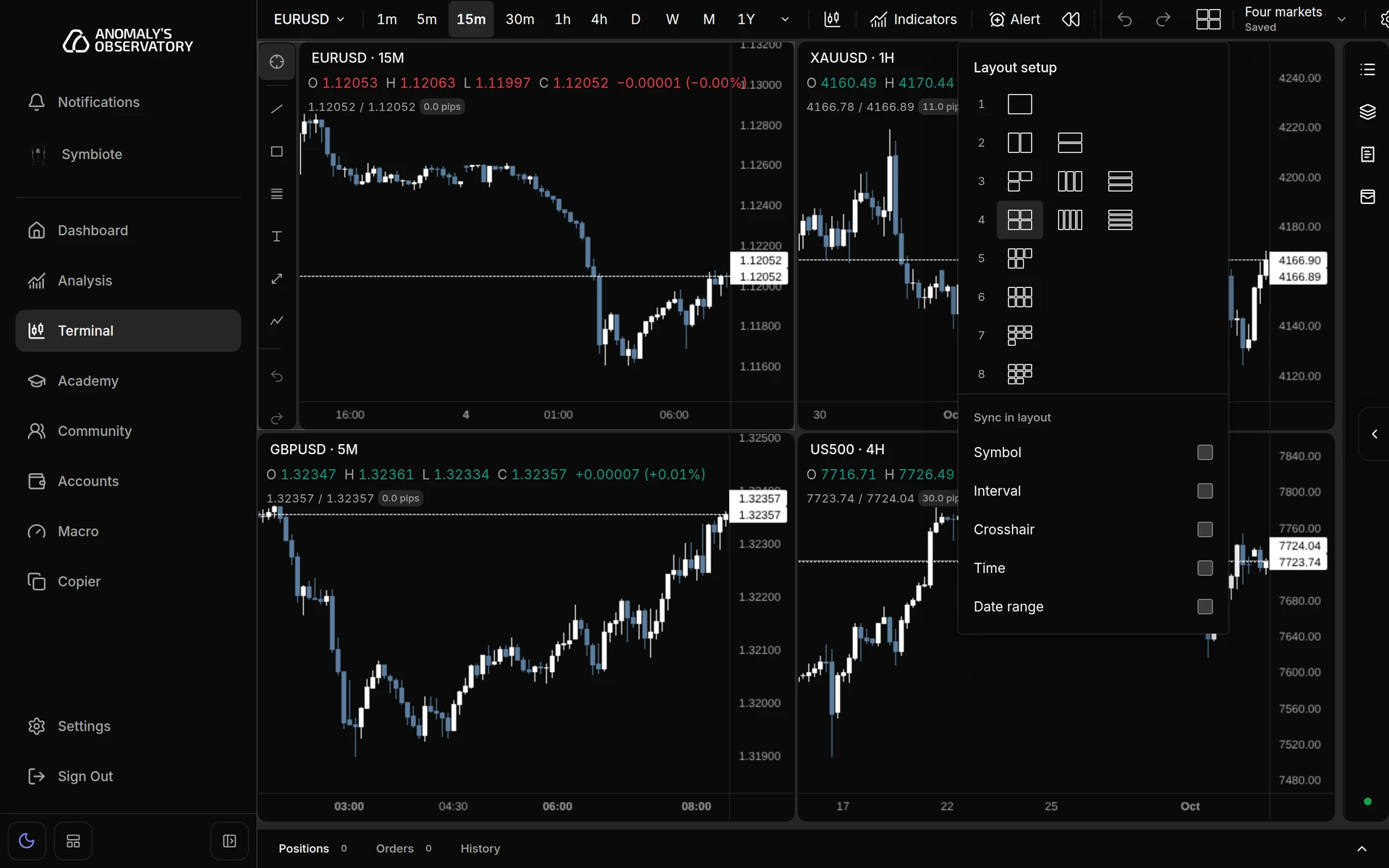
    • NewArrange up to 16 charts side by side, stacked or in a grid, each with its own symbol, interval and studies. Sync the symbol, interval, crosshair, time or date range across them, and save, rename and duplicate layouts.
    • NewChart settings → Status line chooses what the line above each chart shows, from OHLC values and price change to bid, ask and spread.
    • NewBar replay plays past price action from a date or bar you pick, on the current chart or on all of them. Play, pause, step one bar at a time or change speed, then return to live.
    • NewPractise against the replay with simulated market, limit and stop orders, stop loss and take profit, commission and slippage, and follow balance, equity, P&L and maximum drawdown. Real orders are blocked while replay is on. Results stay in the browser tab, so export the trades as CSV to keep them.
    • NewRight-click the chart, or use the + on the price scale, to stage a buy, sell or pending order at that price. The ticket opens filled in and nothing is sent until you confirm. The × on a staged line takes it off the chart.
    • ImprovedDragging a staged entry, stop or target updates the ticket and its risk as you move it, and moving a pending entry carries the stop and target with it. Every line label has grip dots, and the R:R magnet is on by default unless you turned it off.
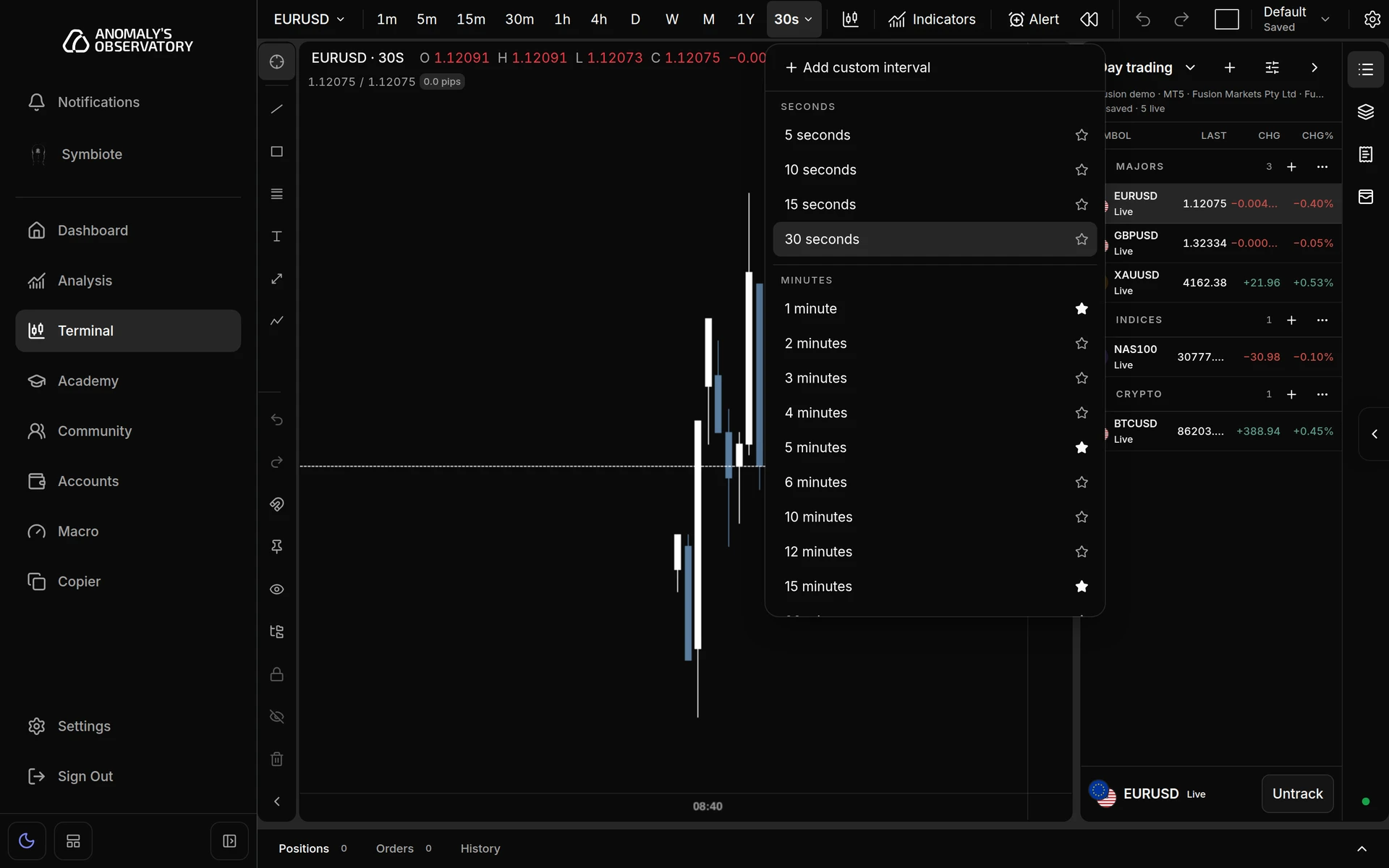
    • NewSeconds charts return on MT5 accounts, with 5s, 10s, 15s and 30s, plus 20s as a custom interval. Bars build from live ticks from the moment you open the chart, so there’s no earlier history. MT4 accounts and AO Market Data don’t offer seconds.
    • ImprovedSymbiote opens from a small tab on the right edge of the screen. Drag it up or down and it stays where you leave it. ⌘J or Ctrl+J still opens it.
    • Terminal with four charts in a two-by-two grid, each on a different symbol and interval, and the layout menu open showing chart arrangements and sync options.
    • Interval menu on an MT5 account with the Seconds group showing 5s, 10s, 15s and 30s above the minute intervals.
  12. Platform

    Smoother sign-in

    Signing in now shows one loading screen instead of two placeholders flashing one after the other.

    • ImprovedOne loading animation runs from sign-in until your workspace opens, without restarting between screens.
    • ImprovedQuick loads skip the loading screen, and the animation holds still if your device is set to reduce motion.
    Read the guideCreate your account
  13. AccountsSymbiote

    Account setup you can follow from any page

    Connecting a MetaTrader account now runs straight through to live data, and its progress stays on screen wherever you go.

    • ImprovedSetup moves on as soon as your broker accepts the login, instead of waiting for a background check that ran every two minutes.
    • NewA progress notice shows each stage, from login accepted to syncing trading data, and stays with you on every page until the account is connected. Open setup takes you back to it.
    • FixedSetup no longer reports an account as connected before live data can reach it, and later changes in a connected account’s status don’t restart the setup notices.
    • FixedSymbiote now answers on Claude Opus 5.5 and Fable 5.1. Both models rejected the way Symbiote asked them to use its tools, so every message to them failed. Other models are unchanged.
  14. TerminalAcademyCommunityAccountsAnalysis

    AO on your phone

    Every page now fits a phone screen, and the terminal has a layout made for one.

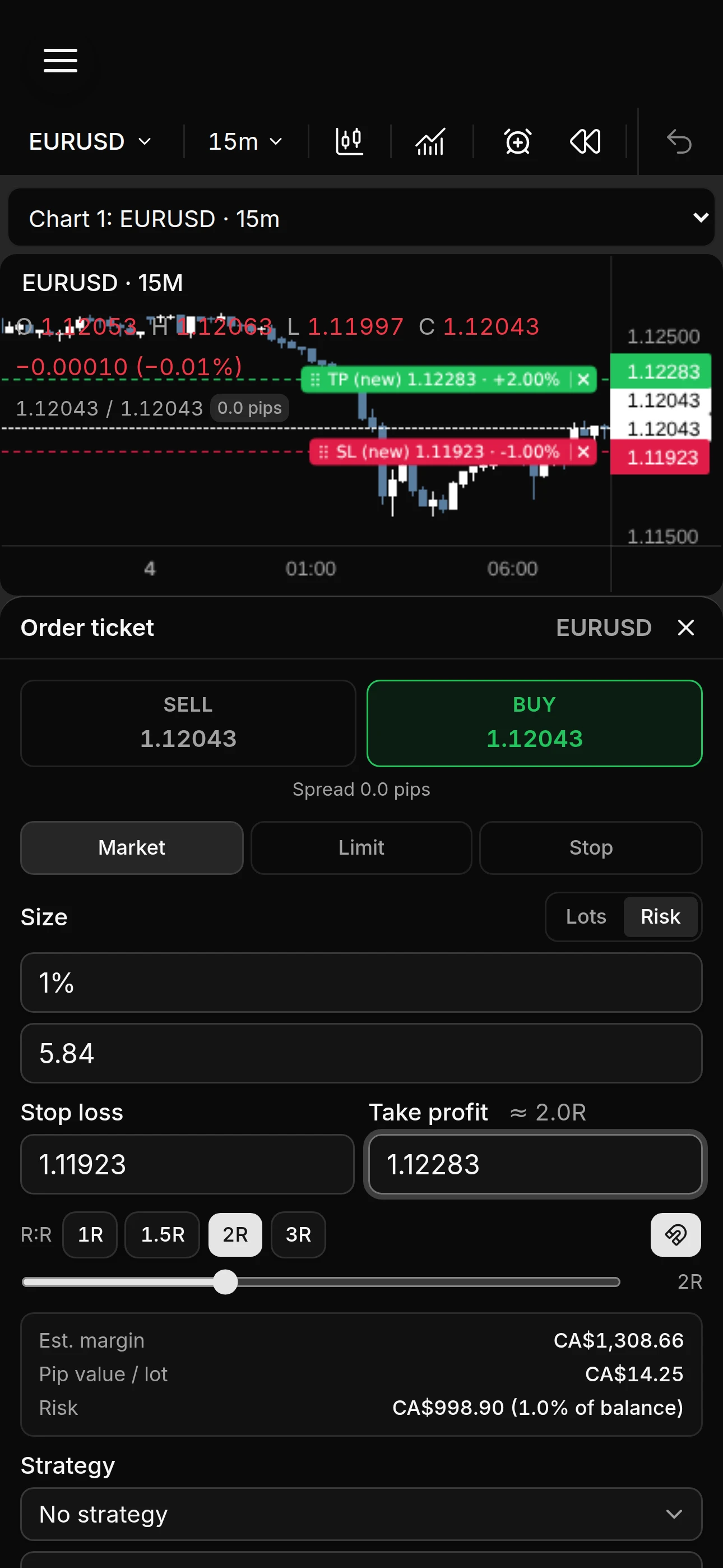
    • NewOn a phone the chart runs the full width of the screen. Tap Trade to open the order ticket in a sheet, with the chart still in view so you can drag the stop and target.
    • NewThe watchlist opens in its own sheet, and the drawing tools sit behind a toggle.
    • ImprovedIn the Academy, section and lesson rows fit a phone screen with larger tap targets, and the curriculum and notes sheets are sized to match.
    • ImprovedIn Community, the Channels button sits in the header and the message box stays fully in view.
    • ImprovedAccounts, Analysis and Symbiote reflow on narrow screens instead of cutting content off, and the account management table turns into cards.
    • AO on a phone, with the chart across the top and the order ticket open in a sheet below it, stop and target lines visible on the chart.
  15. Copy tradingSymbiote

    The trade copier and Symbiote

    Copy a master account into followers without leaving AO, and ask Symbiote, the AO assistant, which cites its sources.

    • NewCopy a master account into follower accounts, each with its own sizing and symbol mappings.
    • NewCopier templates, and a log of every copied trade.
    • NewEvery copied trade passes the follower account’s own risk checks.
    • ImprovedIf a broker’s response is unclear, the copy waits for confirmation instead of retrying, so it can’t open a duplicate.
    • NewSymbiote works across AO on EXODUS lessons, charts and account analysis, with numbered citations to the original material.
  16. Academy

    One shared curriculum

    Every Anomaly now studies from the same EXODUS curriculum.

    • NewLesson details and resources beneath each video or PDF lesson.
    • NewA discussion thread on every lesson.
    • ImprovedStudy history is recorded reliably, and personal notes stay private.
  17. TerminalAcademy

    Instant timeframe switching

    Changing timeframe now shows current candles straight away.

    • ImprovedSwitching timeframe paints up-to-date candles in one step instead of three.
    • FixedLive data renews in the background, so the recurring expiry warning is gone. If the connection drops, prices and chart history stay on screen while it recovers.
    • FixedHeavy chart use no longer runs into a daily loading limit.
    • FixedThe Academy note editor loads its fonts correctly.
  18. Terminal

    Object Tree

    Manage every drawing on your chart from the right rail, next to the watchlist and trade ticket.

    • NewGroup, rename, clone, lock, hide and reorder drawings, and drag them between groups.
    • NewShow drawings on the current interval only, above it, below it or on every interval.
    • NewEdit the style of a whole group at once, with undo and redo.
    • ImprovedDrawing on the chart feels more precise, refined after a review in production.
  19. TerminalRisk controlsRoles & access

    Drawing tools, account rules and roles

    A much larger drawing toolkit, risk profiles for connected accounts and permissions for your team.

    • New25 drawing tools, up from 13, each with its own settings. Existing drawings carry over.
    • NewFund admins can pick a trader’s connected MT4 or MT5 account, assign managers and apply account rules or reusable risk profiles.
    • NewRoles and permissions for the AO team: give a person more than one role and review exactly what each can do.
    • ImprovedSettings has its own navigation.
    • FixedA clean-up pass across Accounts, Settings, Community and the terminal.
  20. TerminalAcademy

    Chart without a broker, and an editable curriculum

    New members can start charting before they connect an account.

    • NewWith no broker connected, the terminal opens on AO Market Data, a read-only feed. Trading stays off until you connect an account.
    • NewSearch and chart the feed’s catalogue of around 230 instruments, with logos for company CFDs.
    • ImprovedWatchlists belong to you rather than one account, and can mix feed and broker symbols.
    • NewEXODUS volumes, sections and chapters can be renamed, merged, deleted and reordered, by drag and drop or keyboard.
  21. AnalysisDashboard

    Performance analysis and a new dashboard

    See how you trade, then review the trades behind the numbers.

    • NewAnalysis: net P&L, win rate, average R:R, drawdown, streaks, profit factor, expectancy and a P&L calendar.
    • NewReview any trade with setup and mistake tags and a comment.
    • NewColour gains and losses to match your candles, in monochrome, or in green and red.
    • NewThe dashboard is now a board with a lane per module: portfolio and P&L, your chart and watchlist, currency strength and recent lessons.
  22. TerminalPlatform

    Saved history first, and faster fixes

    Charts open from what you have already loaded, and problems are caught sooner.

    • ImprovedThe chart paints your saved candle history first, then refreshes it in place.
    • ImprovedThe watchlist stays readable at its narrowest width.
    • ImprovedNew diagnostics across the platform, so problems are spotted and fixed before you have to report them.
  23. Terminal

    Custom intervals

    Chart the intervals you actually trade, and see history before the live feed connects.

    • NewCreate custom chart intervals and star your favourites.
    • ImprovedSaved candle history appears immediately while live data connects.
    • FixedWeekly and monthly charts load reliably.
  24. CommunityAcademy

    Mentions and direct messages

    Community chat now tells you when something needs you.

    • New@mentions with autocomplete, and unread badges on channels.
    • NewOne-to-one direct messages, with an inbox.
    • ImprovedRefreshed lesson navigation and previews in the Academy.
  25. TerminalDesktop

    A rebuilt watchlist

    More on every row, in the layout you choose.

    • NewLogos and flags for currencies, metals, crypto and indices.
    • NewLast, change and change % columns against the previous daily close.
    • NewChoose which columns show, including bid, ask and spread.
    • FixedBroker symbols with lower-case suffixes load correctly.
    • FixedConnecting a broker from the macOS app opens the secure sign-in in your browser.
    • FixedThe macOS app keeps you signed in when it sits idle.
    • FixedIf your session expires, AO asks you to sign in again instead of waiting on “Loading workspace…”.
  26. PlatformDesktop

    AO launches, on the web and on desktop

    AO moves to its own address, and the same private workspace arrives as a macOS app.

    • NewAO runs at its own address, app.ao-io.com, on dedicated production infrastructure.
    • NewA macOS app for the same private AO workspace you use on the web.
    • ImprovedA security review of sign-in, data access and broker connections before launch.
    • ImprovedPages load faster, with fewer requests before anything shows.
  27. Macro

    Macro

    A read on the currency market, built from your own broker’s prices.

    • NewStrength for the eight major currencies, with a transparent directional bias and cross-asset confirmation.
    • NewCalculated from closed hourly candles on your broker’s symbols.
    • ImprovedMissing or stale data is labelled as such, never filled in with made-up values.
  28. CommunityTerminal

    Community chat

    The AO room moves inside the platform.

    • NewChannels and sections, threads, reactions, emoji and image attachments.
    • NewOwners and moderators can add, move and archive channels.
    • NewResizable feed and thread panels on wide screens.
    • FixedCharts no longer show gaps after stale candles refresh.
  29. TerminalAccountsAcademy

    Drawing tools and a live watchlist

    Mark up the chart, and follow several markets without leaving the terminal.

    • NewDrawing on the chart: a tool rail, a floating quick-tool bar and a right-click menu for every drawing.
    • NewA watchlist with live prices and a symbol switcher, to follow several markets and jump between them.
    • ImprovedEach connected account keeps its own symbols, prices and orders, so one broker’s quotes never drive another’s trades.
    • FixedConnect Account always starts a new connection instead of reopening one you already finished.
    • NewYouTube video lessons, grouped in nested curriculum sections.
  30. TerminalAcademy

    Chart history that stays, and a three-column study view

    Charts come back without reloading everything, and notes stay open while you study.

    • NewClosed candles are kept between sessions, so returning to a chart only fetches what has changed.
    • ImprovedHigher timeframes load in the background, so switching to them is close to instant.
    • NewStudy a PDF in three columns: study tools on the left, the lesson in the middle and your notes open on the right.
  31. Terminal

    Faster timeframe switching

    Flicking between timeframes no longer means waiting on each chart.

    • ImprovedRecent candles are kept per timeframe, so a chart you just left reappears straight away.
  32. Terminal

    A study engine for the chart

    Draw what the strategy reads from price, calculated live on the chart.

    • NewChart studies for higher-timeframe candles, day boxes and session mapping, each with its own settings.
    • ImprovedA higher-timeframe slot can hide itself when it isn’t above the chart’s timeframe, and box labels no longer double up.
  33. TerminalAcademy

    Trade history on the chart, and the EXODUS library

    Review closed trades where they happened, and study the full course in the Academy.

    • NewClosed trades drawn on the chart as entry-to-exit lines with their P&L.
    • NewPartial exits grouped under the original position, in a history pane you can resize.
    • NewThe full EXODUS course in the Academy library, with first-page previews in card and list views.
  34. TerminalDashboardAcademy

    Chart themes and a dashboard per account

    Make the chart yours, and see one account at a time.

    • NewChart colour themes, a command palette and one-click price copying.
    • New15- and 30-second charts, built from live quotes, so they start without history.
    • NewScope the dashboard to one account or all of them, with archived accounts kept apart.
    • ImprovedNavigation and Academy names can be set to match the course.
  35. TerminalDashboard

    The terminal

    Chart and trade your connected accounts inside AO.

    • NewLive candlestick charts with symbol and timeframe switching, in resizable panes.
    • NewMarket, limit and stop orders, with stop loss and take profit, from the order ticket.
    • NewManage open positions and pending orders: move stops and targets, or close in part or in full.
    • NewEntry, stop and target drawn as price lines on the chart.
    • ImprovedThe dashboard charts your own journal, account and strategy data.
  36. DashboardAccountsAcademy

    The foundation

    The first release: one private workspace for your trading, your accounts and your study.

    • NewA trading dashboard and journal, with P&L and the detail behind every trade.
    • NewConnect MT4 and MT5 accounts and follow their live state, with no balances typed in by hand.
    • NewAccounts as a live command centre: portfolio equity, floating P&L and anything that needs attention.
    • NewThe Academy: courses, sections and lessons, with video and PDF study.
    • NewA rich note editor beside every lesson, plus a study timer, session history and chapter statistics.
    • NewSecure sign-in, with every record visible only to you.